Shield
 Probe
 Strike
 LivStatus
 Grow
 Flow
 Pulse
 Kite
 Blink
How to Report a Fake Profile or Morphed Image on WhatsApp Before It Spreads
Published by Aqib Muhammed, CEO

Fake profiles and morphed images are a real risk on WhatsApp and they are not always easy to act on once they appear. The account might be impersonating someone to reach their contacts or an edited image might be circulating in chats where it is hard to trace.
One thing to get clear before you start. WhatsApp is not Instagram. There is no public profile to flag, the chats are encrypted and what can be reported depends on what reached the phone involved.
This guide covers how to report a fake profile or morphed image on WhatsApp, so you know what to save, what to report and when the situation calls for more than the app itself.
Fake Profile Or Morphed Image : Which One Are You Dealing With?
Two problems get lumped together and they need different first moves. One is a number using your name or photo to message other people. The other is a morphed or AI-edited image of you being passed around or used to threaten you. Find your situation below before you touch anything.
What you’re seeing | What it usually is | Your first move |
A stranger’s number carries your photo or name and is messaging your contacts | Impersonation aimed at people who trust you | Ask the people it messaged to report it from their phones |
A number messages you while pretending to be someone you know | A hijacked account or a copy of a contact | Report and block it from your own chat |
A morphed or AI-edited image of you is circulating or is attached to a threat | Image abuse | Save it, report it and take it past WhatsApp |
Most fakes are after money or attention, not you personally. Acting on the first day is what keeps the damage small, because a number that several people report and block has a short life. Stay calm and work the steps in order.
If the fake turned up on Instagram instead, we wrote a separate guide on reporting a fake profile or morphed image on Instagram.
What To Save Before You Block Or Delete Anything
Block too soon and you lose the chat, the number and the proof along with it. Capture everything first. Blocking can wait five minutes.
- Screenshot the contact-info screen so the number, the display photo and the name sit in one shot.
- Screenshot the messages with their timestamps showing.
- Keep the original, unedited photo that was morphed. Hold on to the source file, not a screenshot of it.
- Export the chat so you have a dated record. The “Export chat” option without media is enough.
- Write down the full number, country code included.
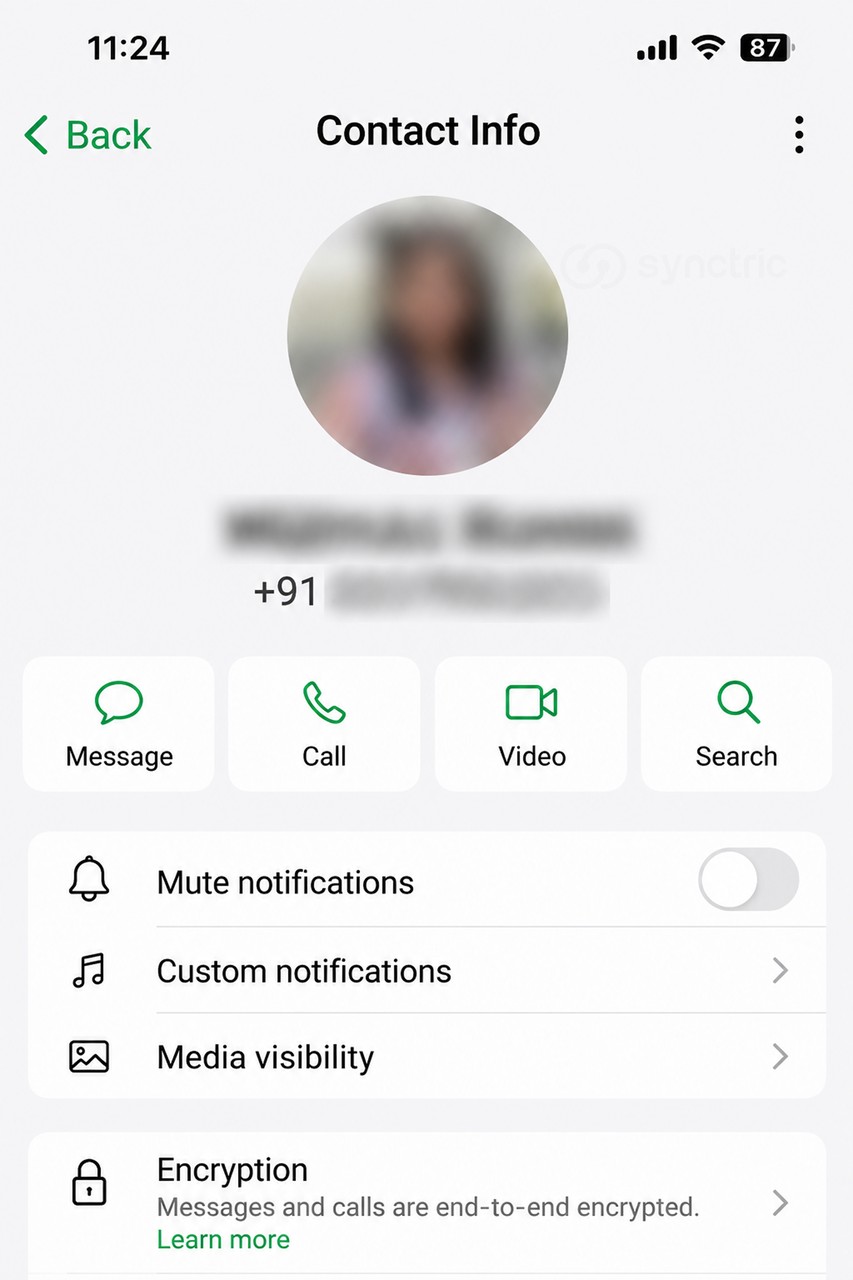
Save this first. A screenshot of a photo throws away its metadata, the date and device details saved inside the original file, which can help show the real picture is yours. Keep the original file as well as the screenshots.
How To Report A Fake Profile Or Morphed Image On Whatsapp, Step By Step
You report a WhatsApp account from inside the chat itself. There is no separate impersonation form in the app the way some platforms have one, so reporting the chat is the route.
- Open the chat with the fake number.
- Tap the name or number at the top to open contact info. On some phones you tap the three-dot menu, then More.
- Scroll down and tap Report.
- Tick Block and choose whether to keep or delete the chat. Keep it if you still need the proof on your phone.
- Confirm the report.
- If the same number messaged other people, ask each of them to report it too. Reports from several people carry more weight than one.
To report a single morphed image rather than the whole chat, press and hold the image, then tap Report. That sends the one message to WhatsApp instead of the full conversation.
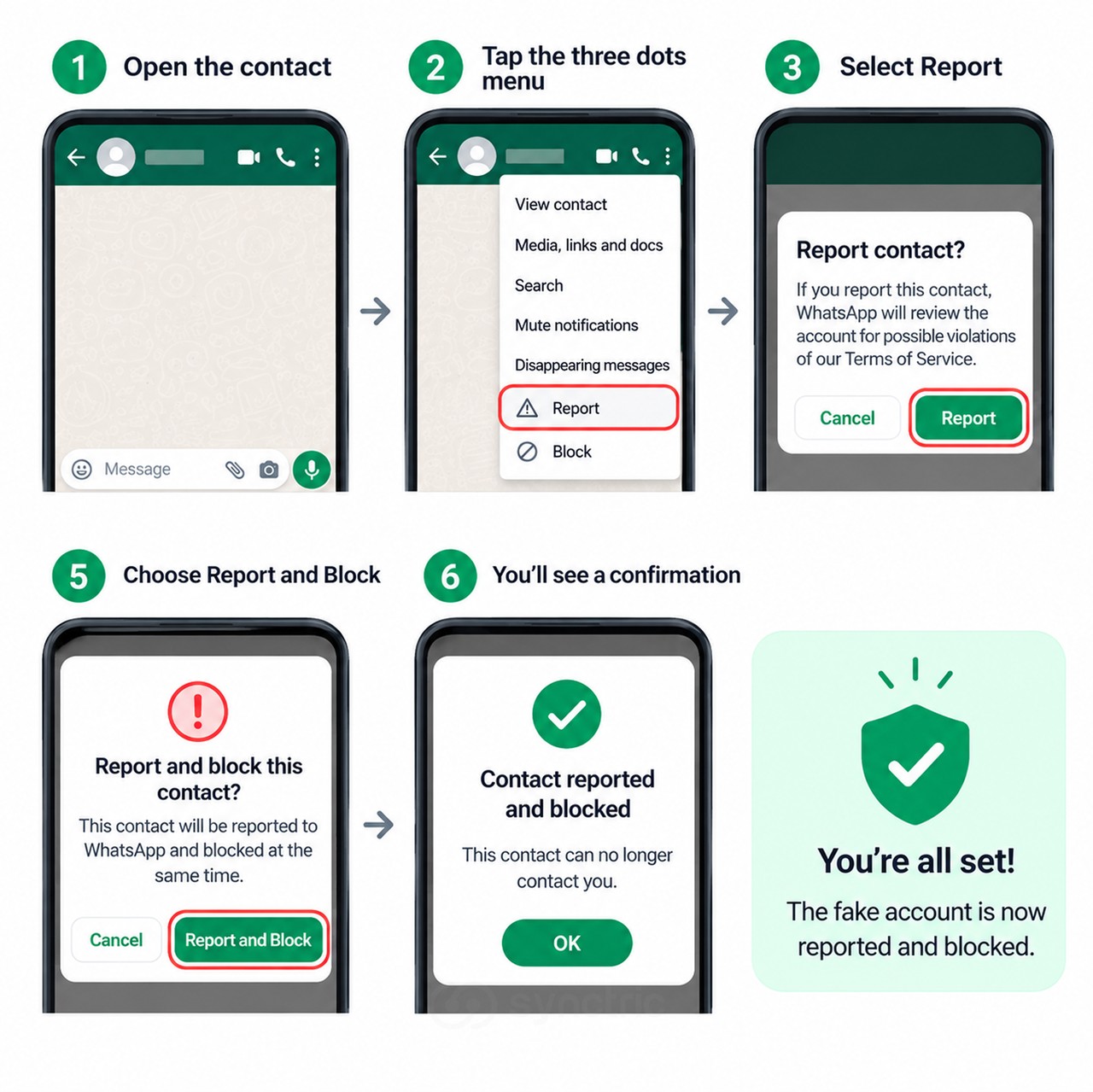 WhatsApp’s own help page on reporting explains what the app shares when you report a contact.
What Reporting On Whatsapp Actually Does And What It Can’t
Reporting is worth doing, but it is not a remove button. Here is what happens and what does not, so you are not sitting and waiting on an outcome that is not coming.
What a report does | What a report won’t do |
Sends WhatsApp up to the last five messages that number sent you, plus its user ID and basic details about those messages | Ban the account on its own |
Lets WhatsApp step in if the account breaks its rules | Tell you what it decided or whether it acted at all |
Counts for more when several people report the same number | Let you report a fake you cannot see in a chat or pull back an image already forwarded out of WhatsApp |
The honest limit
WhatsApp can only see a fake account through a chat you report. If a number is pretending to be you to other people and has never messaged you, you cannot report it yourself. The people it contacted have to do that from their own phones.
This matters most for a morphed image. Once it has been forwarded, it can be sitting in group chats or on the open web before you ever see it. Reporting the chat shuts one door. It does not find the copies already out there, which is what the next two sections are for.
When To Take It Past Whatsapp
If there is a threat, money has moved or the image is sexual in nature, WhatsApp is not where this ends. Report it to the cyber-crime authorities as well and do it early.
- If any money has changed hands, contact your national cyber-crime helpline first. Speed matters most there.
- File a complaint on your country’s official cyber-crime reporting portal. Most let you file without giving your name, though adding your details can get the complaint handled faster.
- For a morphed image of a sexual nature, use the reporting category meant for image-based or sexual abuse if the portal offers one.
- If it keeps going, take your saved proof to your local cyber-crime unit or the police.
If money is involved. Do not pay and do not argue with the sender. Paying rarely ends it and replying can warn them to delete the account and open a new one. Save, block, report, in that order.
For an image that is already circulating, a service like StopNCII makes a digital fingerprint of the picture on your own device and shares only that fingerprint, so participating platforms can spot and block matching copies without you uploading the image anywhere. A reverse-image search helps you find where it has already appeared.
Making or sharing a morphed image of someone can be a criminal offence, which is why cyber-crime units take these cases seriously. The sooner your complaint is on record, the more the authorities have to work with.
When A Morphed Photo Has Already Left The Chat
The hardest part is not the chat you can see. It is the copy you cannot, turning up weeks later on a site you would never think to check. Once an image has been forwarded out of WhatsApp, finding where it landed becomes a job of its own and doing it by hand means checking the same sites over and over.
This is where image-monitoring tools earn their keep. Strike by Synctric scans the open web and social platforms for your face and files the removal requests when a copy surfaces, so you hear about it early instead of months later. When a removal goes through, it keeps a record of that image so the same file is caught again if it resurfaces and each request sits in one place rather than scattered across your inbox.
If one is already showing in search results, our guide on removing a photo from Google walks through getting it delisted.
Reporting A Whatsapp Fake : Six Questions Worth Answering
Does reporting a WhatsApp account automatically get it banned?
No. A report is not an automatic ban. WhatsApp may act if the account breaks its rules and reports from several different people make that more likely, but one report on its own rarely removes an account.
Can I report a fake WhatsApp account that is messaging my contacts but not me?
Not directly. You can only report a chat that exists on your own phone. Ask the people the fake account messaged to report and block it from theirs, since that is the only way WhatsApp gets to see it.
What does WhatsApp receive when I report a contact?
Up to the last five messages that number sent you, along with its user ID and basic details about those messages. It does not get your full chat history and the person you report is not told about it.
Should I block the fake account or report it first?
Report first, then block. Reporting carries the recent messages to WhatsApp and blocking stops the contact after that. Save your screenshots before you do either, because a blocked chat is harder to go back to.
Can I still report a morphed image if I already deleted the chat?
Reporting works from the live chat, so once it is gone that route is closed. Your saved screenshots and the original photo still back up a cyber-crime complaint, which does not depend on the WhatsApp chat.
Will anyone tell me what happened to my report?
WhatsApp will not follow up or share the outcome. A cyber-crime complaint is different. It gives you a reference number you can use to check on progress yourself.