Shield
 Probe
 Strike
 LivStatus
 Grow
 Flow
 Pulse
 Kite
 Blink
What Is Business Process Automation? Examples for Sales & Support Teams
Published by Aqib Muhammed, CEO

If you run a sales or support team, you already know where those hours go. New leads sit in an inbox until someone gets around to assign them. Customers call twice before they get an answer . Reps spend more time updating records than talking to buyers. Not for lack of trying, none of this. It happens because there is no ownership of the steps between one tool and another.
This guide explains what business process automation is, how it works and the most common examples used by sales and support teams including where a person still needs to step in.
What is business process automation?
Business Process Automation (BPA) is the use of software to run repeatable, multi-step business processes with little or no manual work. It connects the tools a team already uses through triggers, rules and data so routine steps happen on time and people handle the exceptions.
The key word is process. A process crosses steps and systems: a form feeds the CRM (customer relationship management software), which alerts a rep whose call sets up the next follow-up. Automating one step, like an email template, is task automation. BPA links the steps so the whole chain runs without someone pushing each one along.
Rule of thumb : If a step happens the same way every time and starts from an event you can name, software can probably do it. If it needs judgment, automate the steps around it instead.
How does business process automation work?
Every automated process has four parts: a trigger (the event that starts it), rules (the conditions that decide what happens), actions (what the software does) and a handoff (the point where a person takes over).
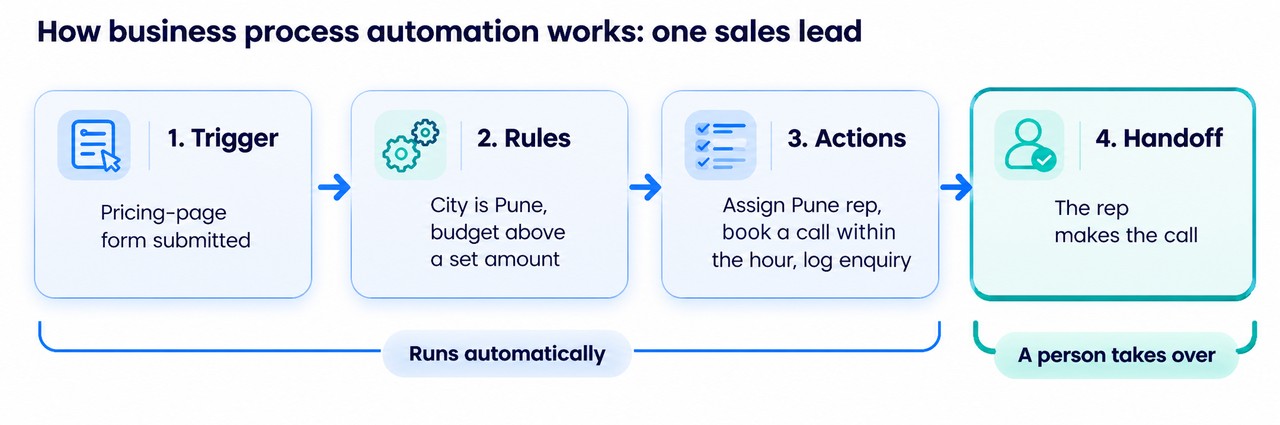
The four parts of an automated process, shown on one inbound sales lead
Rules are where your team's know-how goes in. Most are simple if-then statements that the person who runs the process can write: if the budget is below your minimum, send a brochure instead of booking a call; if no rep is free in that city, pass the lead to the nearest branch.
The handoff is the part teams skip. Without one, automation either drops work or traps customers in a loop of bot replies. A simple test: if you can't say where a person takes over, the automation isn't ready.
Why do sales and support teams lose leads and customers to manual work?
Manual work slows the first reply and in sales and support a slow reply is how leads go cold and customers lose patience. Both teams also spend most of the week on work that isn't selling or helping customers. Salesforce's 2026 State of Sales report found the average seller spends only 40% of their time selling. Its latest State of Service report found service reps spend 46% of their time with customers. The rest goes on data entry, internal updates and chasing other teams for information.
Automation takes that work over and the payoff shows up in four places:
- Faster first replies. New leads and customer messages reach the right person in moments instead of waiting in a shared inbox. A Harvard Business Review study, "The Short Life of Online Sales Leads", found that firms that contacted a lead within an hour were far more likely to qualify it than firms that waited longer.
- One view of the customer. Calls, emails, past orders and old tickets sit on a single record, so a rep or agent can pick up any conversation without hunting across tabs and apps.
- Fewer manual errors. When details move between systems on their own, nobody retypes a phone number, a price or an order ID, so fewer mistakes reach customers.
- Less repetitive work. Fewer hours of copy-and-paste admin means less of the daily grind that wears sales and support staff down.
Business process automation examples for sales teams
Sales automation removes the admin between a lead arriving and a rep talking to them. Most sales teams start with these five.
Example | Trigger | What runs automatically | Where a rep takes over |
Lead routing | A new lead arrives from a form, ad or WhatsApp | Assigned by territory, product or round-robin (taking turns) within a minute | The rep makes first contact |
Lead enrichment | A web form is submitted | Company size, industry and role added from a data provider | The rep checks fit before calling |
Automated follow-up sequences | No reply or a missed meeting | Pre-written emails or SMS go out on a schedule | The rep steps in when the prospect replies |
CRM data entry | A call, email or meeting ends | The activity is logged on the lead record | The rep adds notes that need judgment |
Quote and proposal generation | A deal reaches the quote stage | A quote is built from CRM pricing and customer data | The rep checks the terms and sends it |
Why multi-branch sales teams need an AI-powered field sales management tool
Follow-up rules are easy to set but hard to stick to when leads come in from many ads and your reps work from different branches.
Grow by Synctric is field sales management software built for those teams, such as lending and insurance businesses. It pulls in leads from Meta, Google Ads, WhatsApp and website forms routes each one to the right branch and rep by your rules and schedules every call or visit with a grace timer. Optional AI features add lead summaries, manager briefings and suggested visit routes.Take a look at how Grow plans a field sales day.
Automation examples for customer support teams
Support automation keeps high message volumes moving and gives every waiting customer an owner. Follow one ticket through the four automations most support teams use.
- Chatbot and self-service answers. At 11 pm a customer asks, "Where's my refund?" A bot trained on your help articles answers at once. If that doesn't solve it, the chat moves on.
- Automated ticket routing. The message is read, tagged by issue type and product, turned into a ticket and assigned to the billing queue.
- Status updates and notifications. When the ticket moves to "in progress" or "resolved", the customer gets an automatic SMS or email.
- Escalation rules. If the ticket goes unanswered past its SLA (service-level agreement, the response time you have promised), a supervisor is alerted.
People still take the judgment calls: refunds outside policy, unusual problems and upset customers. Good support automation spots frustration and passes the chat to an agent with the history attached, so the customer doesn't repeat themselves.
Why support teams need AI customer support software that knows when to hand over
Customers now message you on several apps at all hours and a bot that never hands the chat to a person only makes them more upset. Good AI customer support software answers simple questions on its own, works across your chat apps and knows when to pass a conversation to your team.
Flow by Synctric is one option built this way. It brings WhatsApp, Instagram, Facebook Messenger and website chat into one inbox and its AI answers routine questions from your own FAQs and policies, including messages in Hinglish, Manglish or Tanglish. When a customer gets frustrated or a question gets complex, Flow passes the chat to an agent with the full conversation and opens a ticket for the right person.Find out what Flow answers on its own.
Which business processes should you automate first?
Start with the process that is high volume, follows fixed rules and already causes pain. For most sales teams that is lead routing. For most support teams it is ticket routing.
- Write the process down step by step, including who does each step today.
- Mark which steps follow a fixed rule and which need judgment.
- Name one owner for every exception, such as a lead from a city with no branch or a ticket that fits no category.
- Pick one number, such as first-response time or leads contacted the same day and track it for four weeks before and after.
Questions teams ask before automating sales and support work
What is the difference between BPA and BPM?
BPM (business process management) is the practice of mapping, measuring and improving how work gets done. BPA is the software that carries it out. BPM decides what a process should look like and BPA runs it.
Is BPA the same as AI?
No. Rule-based automation follows logic you set, while AI can read a message, work out its meaning and draft a reply. Many tools combine both. Service teams surveyed by Salesforce estimate AI handled 30% of cases in 2025 and expect that to reach 50% by 2027.
Will automation replace sales or support jobs?
It replaces tasks, not roles. Logging calls and sorting tickets move to software, while conversations, negotiation and difficult cases stay with people. The realistic effect is time handed back, not headcount removed.
Is business process automation worth it for a small business?
Yes, if you start with one high-volume process instead of everything at once. Small teams feel dropped handoffs most because nobody has spare time to catch them and many tools are monthly subscriptions that need no developers.
How long does it take to automate a process?
A single workflow, such as lead or ticket routing, can usually go live within days once the rules are written down. Agreeing on the rules takes longer than the setup. Rolling out across several teams typically takes weeks to months.
What are the disadvantages of business process automation?
The main ones are setup time, upkeep when connected tools change and rules too rigid for unusual cases. Automation can also hide problems: a wrong rule repeats the same mistake in every case until someone notices.
For more practical guides from the Synctric team, visit the Synctric blog.