Shield
 Probe
 Strike
 Grow
 Flow
 Pulse
 Blink
I accidentally downloaded the Parivahan APK from WhatsApp - what should I do now?
Published by Ketan Ramshawala
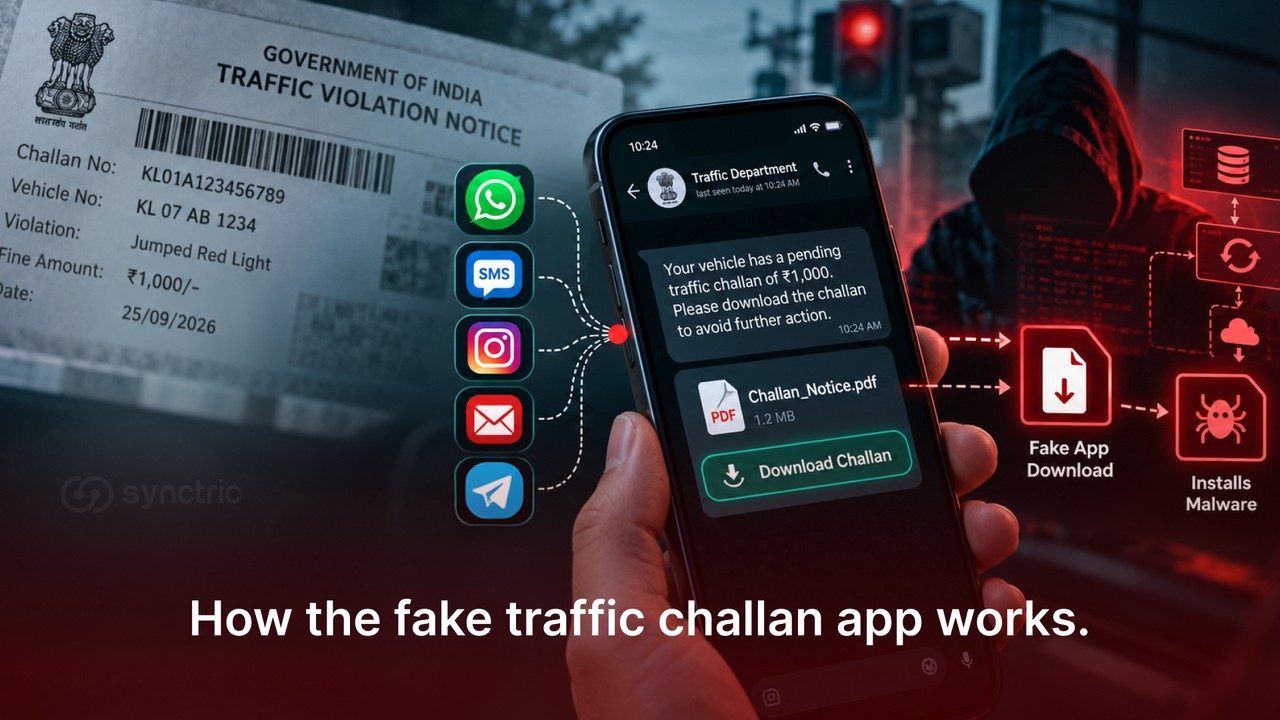
Downloaded a fake traffic challan APK from WhatsApp? Downloading isn't installing. Here's how to check in five minutes and why call forwarding matters.
Don't worry. Downloading a file and installing an app are two separate actions and Android requires your permission before an app can be installed and run.
Although there are a few checks you should perform first to make sure your device is not under threat.
Below you'll find what to check, how to determine whether the malware app was actually installed, what it can do if it was installed and how to keep your device safe from similar threats in the future.
I downloaded the APK but did not open it. Can they still take my money?
No, not from the download by itself. A file sitting in your Downloads folder does nothing until you act on it.
 A fake traffic challan notice received on WhatsApp.
An APK or Android Package, is just the packaging Android uses to carry an app. Your phone unpacks one every time you install from the Play Store, so the file type is not the warning sign people take it for. What decides the outcome is how far you went after tapping it.
What you did | What it means | Where you stand |
The file downloaded only | Nothing has run. | Safe. Delete it. |
You tapped it, saw an install screen, backed out | Android asked. You declined. | Safe. Delete it. |
You allowed unknown sources and tapped Install | An app is now on your phone | Treat it as exposed |
You entered your vehicle number, card details or UPI PIN | That information has left your phone | Treat it as exposed |
Many people assume the danger starts when an app asks for permissions. With the fake traffic challan APK, the moment that counts arrives earlier: the permission you give Android to install apps from unknown sources.
None of this applies on the iPhone. An APK cannot be installed on iOS, so delete the file, report the message and move on.
How to check whether the fake mParivahan app actually installed
Your home screen will not tell you. The fake mParivahan app copies the genuine icon and commonly keeps itself out of the app drawer, so a familiar-looking screen means little. Everything below happens in Settings.
- Open Settings, then Apps, then Special app access, then Install unknown apps. If WhatsApp or your browser shows Allowed and you did not set that, an install went through from it.
 Image source: Kaspersky (Menu names shift between brands, but searching Settings for "unknown apps" reaches the same screen on most phones.)
- Go back to Apps, then See all apps. Scroll the whole list, looking for anything you do not recognise and for a second entry resembling mParivahan.
- Tap anything unfamiliar, then Permissions. Access to SMS is the one that matters. A vehicle app has no business reading your texts.
A mobile antivirus scan that comes back clean is not proof. This malware is built to survive it and a government advisory on fake e-challan apps warns it may not appear in your app list at all.
How the fake traffic challan app works, step by step
This is a two-stage attack and the distinction explains almost everything else about it. The file you downloaded is a dropper, a small app whose only job is to fetch and install a second one.
That second app is the payload and the payload is what reads your messages and takes your money.
 The two stages, from the WhatsApp message to a payload working quietly in the background.
What follows describes one version of this malicious APK we examined in detail. Other samples behave differently in places.
Stage one: the dropper
Labelled NextGen mParivahan, the dropper holds no SMS, contacts or accessibility permissions. Those sit in the payload.
- It opens on a fake Downloading Updates screen.
- It calls the operator's server, which names the payload to fetch, so the payload is swappable server-side.
- It loops the Allow install from unknown sources prompt every half second until you agree.
- The payload arrives encrypted, decrypting as it lands, never readable at rest.
- A fake VPN dropper named ‘PlayStore’ is raised just before the install and dropped after. It forwards nothing, so the phone loses internet during the install, suppressing Google Play Protect's cloud check. Its notification reads that the Play Store is running, so the outage looks routine.
Stage two: the payload
Twenty-two permissions, chiefly SMS read, receive and send, plus a notification listener. Three things run at once.
It walks your message store backwards in batches, resuming after reboot. There is no floor on that loop: given time and a connection, the operator receives every message the phone has ever held. It sets unconditional call forwarding per SIM. And it wakes a locked handset to send SMS from your number, turning infected phones into a sending fleet for the next round of scam messages.
What to do right now if the app is on your phone
Work through these in order. Sequence matters more than speed.
- Do not open the app again or enter anything further into it.
- Turn on aeroplane mode, so nothing else leaves the phone while you work.
- Screenshot the app entry in Settings before removing it. Your bank may need it.
- Check your call forwarding, covered next. It outlives both the app and a factory reset.
- Uninstall the hidden app first, then the one you downloaded.
- If you entered card details, a UPI PIN or a one-time password, change them from another device, then call your bank.
If money has already moved, act within the first hour. Call 1930 and file at cybercrime.gov.in. Early reporting is what makes a hold on the receiving account possible.
Check your call forwarding: a factory reset does not clear it
Call forwarding sends your incoming calls to another number. The setting lives with your mobile operator and is tied to your number, not your handset, so resetting or replacing the phone leaves it untouched.
Not every malicious app changes this. Rule it out anyway: voice calls from your bank would go to someone else without your phone ringing.
Dial *#21# on each SIM or open your phone app and look under Settings, then Call forwarding. If something unfamiliar appears, dial ##002# to cancel all forwarding, then call your operator. That code also clears voicemail diversion, so ask them to restore it.
Some phones block these codes. Call your operator directly instead.
What the attackers actually got and what they did not
This split is drawn from the payload’s own permissions and the code paths that were actually reachable, not from what the app could theoretically do.
Assume taken | What that means |
Your entire SMS history | Every message ever on the phone, not only ones received after the install. Years of banking messages, one-time passwords and identity documents sent by text. |
Card details | Number, expiry, security code and cardholder name, if you completed the payment screens. |
Your UPI PIN | Captured on every attempt, including anything you typed again after a wrong PIN screen. |
Incoming voice calls | If call forwarding was set. Bank verification callbacks and voice one-time passwords go to the operator. |
Device and SIM identity | Phone model android version, both SIMs, carrier, public IP address and granted permissions, sent on every check-in. |
How to check whether a traffic challan is real
Do not use any link from the message. Type echallan.parivahan.gov.in into your browser yourself and check there.
The portal asks for your vehicle number, challan number or your driving licence number. The vehicle route also needs the last five digits of your chassis or engine number, printed on your registration certificate, then a captcha. If nothing shows against your vehicle, the message was almost certainly fake. Some states run their own portals, so check yours too.
Signs a fake challan message is not genuine:
- Sent from an ordinary 10-digit mobile number, not a government sender ID
- A web address close to the official one but not exact
- The same fine appears for any vehicle number entered
- No captcha before results
A real challan will wait until you check it independently. There is no reason to pay from a message.
Where to report a fake traffic challan message in India
Which channel depends on what happened.
If money left your account, call 1930 first. The helpline can ask the receiving bank to freeze the amount. Then file at cybercrime.gov.in, which creates the formal record. Tell your bank in writing too.
If you only received the message, report it through Chakshu at sancharsaathi.gov.in/sfc, the Department of Telecommunications route for fraudulent calls, SMS and WhatsApp messages received in the last 30 days. You can attach a screenshot.
Either way, report and block the sender inside WhatsApp. Keep a screenshot of the message, the sender’s number and the amount, time and transaction ID if money moved.
What to take away from this
Most people who arrive at this page are not infected. They downloaded a file and stopped and deleting it closes the matter.
If you went further, the order matters: clear your call forwarding first, because it outlives the phone, then remove both apps, then change anything you typed.
If someone in your family would have tapped it, send them this article.
If you are reading this from the other side of the problem, at a bank, an NBFC or any business whose customers receive these messages, the campaign is worth understanding in detail. The analysis in this article came from Synctric’s own security team, working from the sample itself rather than from public reporting.
Synctric Security covers the threat layer across breach monitoring, security testing, takedown and social engineering simulation.
For more on scams targeting Indian phone users, see the Synctric blog.
FAQ’s
I checked and the government website looked real. How was it fake?
Part of it was real. The app loads a genuine Ministry of Road Transport and Highways page inside itself, so the site you saw was authentic. Your card details and UPI PIN were taken on the app's own screens before and after that page, not on the government one. National Informatics Centre and Digital India branding around it made the rest look consistent.
I paid the ₹1 fee. Does that mean they have my UPI PIN?
Not by itself. Paying ₹1 does not reveal a PIN. What matters is whether you typed your PIN into a screen inside the app. That screen was built to resemble your UPI app, but your real UPI app never opened. If you entered a PIN there, assume it was taken, including any you typed again after a wrong PIN message.
I uninstalled the app. Is it gone?
Only partly. Two apps were installed and the second one does not appear in your app drawer, so removing the one you can see leaves the other running. Uninstalling also does nothing about card details, PINs or messages already sent to the operator.
Will a factory reset remove the fake mParivahan app?
Yes, a factory reset removes both apps. It does not remove call forwarding, which is held by your mobile operator, not the phone.
The message had my real vehicle number. How did they get it?
Vehicle registration details circulate widely through leaked databases and resold records, so a correct vehicle number proves nothing about the sender.
I use two SIMs. Do I need to check both?
Yes. The payload handles each SIM slot separately, so call forwarding can be set on one and not the other. Run the *#21# check on each SIM and give your operator both numbers when you call.