Shield
 Probe
 Strike
 Grow
 Flow
 Pulse
 Blink
How Do Hackers Get Employee Email Addresses?
Published by Aqib Muhammed, CEO
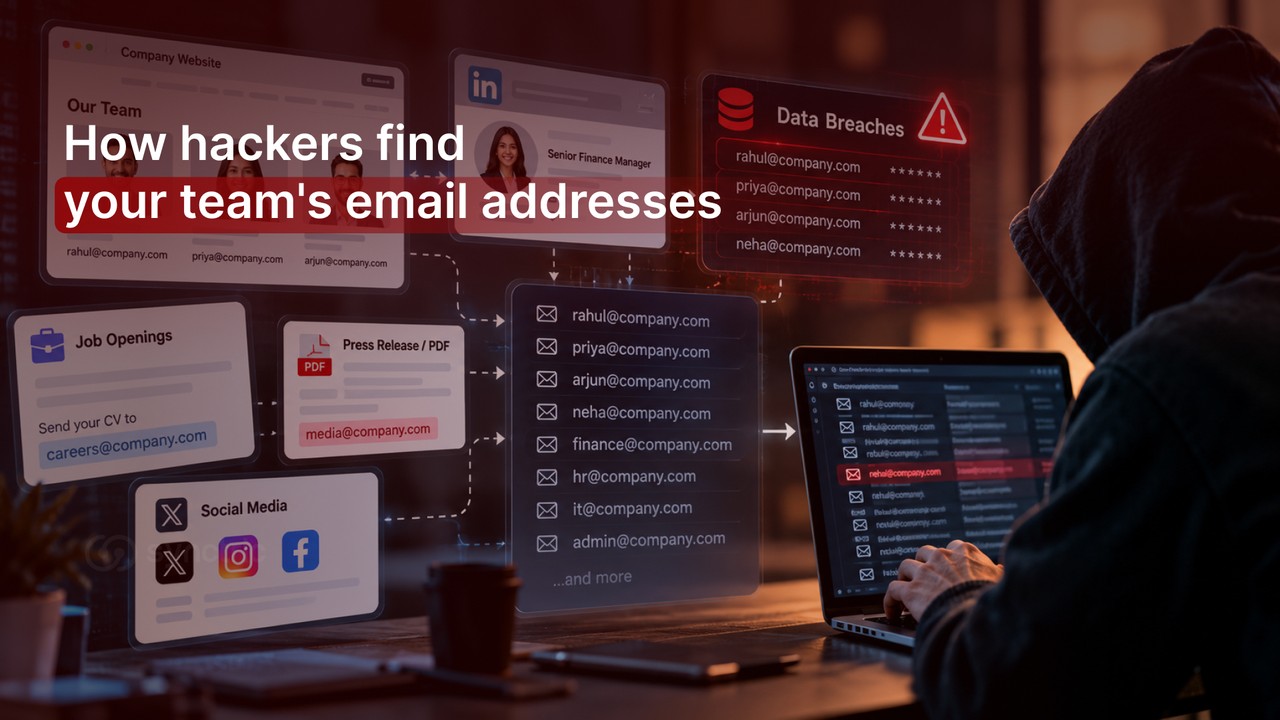
How many of your employees’ email addresses could a stranger find before tonight?
If your answer is “a few”, the real one is probably “almost all of them”. No one has to slip up. The clues sit on your website, on LinkedIn and in old sign-ups nobody thinks about any more.
So how do hackers get employee email addresses? It usually starts with a page on your own website that everyone forgot was public. That’s where we’ll start too.
How do hackers get employee email addresses?
Hackers get employee email addresses in four main ways: scraping public websites and social media, guessing the company's email format and testing the guesses, pulling addresses from old data breaches and stealing them through phishing or a hacked contact's address book. Most attacks combine two or more.
Method | Where the address comes from | What the attacker ends up with |
Scraping | Company website, PDFs, press releases, job ads, social profiles | Names, job titles and some exact addresses |
Guessing and testing | One real address plus a list of staff names | A near-complete staff email list |
Data breaches | Outside websites staff joined with a work address | Addresses, sometimes with old passwords |
Phishing and contact theft | Fake sign-in pages, a partner's hacked inbox | Addresses plus passwords or live email threads |
Security teams call this stage reconnaissance. MITRE ATT&CK, a public catalogue of attacker techniques, identifies email address gathering as a separate technique and explains that it is difficult to prevent because it occurs outside your network. network.
How do hackers scrape employee emails from websites and social media?
Automated bots read public web pages the way a search engine does and copy anything shaped like an email address. This is called email harvesting. Social media then fills in the names and job titles the bots couldn't find.
Company Websites & Public Records
Think of your public footprint as a phone book you didn't know you had printed. Work addresses sit on team and contact pages, in PDFs such as annual reports, in press releases naming a media contact and in job ads that say "send your CV to". Event speaker lists and public code repositories add more.
Social Media Mining
Professional profiles rarely show an email address. They show names, job titles and reporting lines, which is exactly what the guessing step needs. Attackers look first for finance, HR, IT administrators and executive assistants. New-joiner posts ("Excited to start at…") help too, because someone in their first weeks doesn't yet know what a normal internal request looks like.
Key takeaway: Social media profiles rarely reveal the email address directly. They leak the name and role that make the address easy to guess and the scam email easy to believe.
How do hackers guess an employee's email address?
Most companies use one email format for everyone. Find one real address and you have the pattern for all of them. if priya.nair@example.com exists, rahul.menon@example.com almost certainly does too.
Working out the email format
One scraped address, an email signature or a reply to a newsletter is enough to reveal the pattern. Four formats cover most companies : firstname.lastname, firstname, first initial plus lastname (rmenon) and firstnamelastname. Some public business directories even list a company's likely email format.
Generating and testing guesses at scale
A permutation generator is software that writes out every likely version of each staff name in every common format. The attacker then tests which guesses are real across the whole domain, by sending emails and watching which bounce or by noticing that some sign-in pages respond differently to real and made-up accounts. None of it needs access to your systems.
“Assume attackers can work out every address at your company. The useful question is what they can do with one”
How do data breaches expose work email addresses?
When a website an employee joined with their work address is breached, that address ends up in leaked data, along with a name, a job title and sometimes a password. Attackers trade and reuse that data. Your company was never hacked, yet its staff list leaks anyway.
Picture a marketing manager who joined a webinar platform with his work address years ago, using a password he still uses elsewhere. The platform is breached. Her forgotten sign-up is what security teams call a ghost account: a login he no longer thinks about, still carrying his work address. Here is how a forgotten sign-up can end in a hacked inbox.
Warning: A breached address with a reused password is a working login. In June 2026, Cybernews researchers found one exposed database holding about 24 billion stolen records such as usernames, email addresses, plaintext passwords and the sign-in pages they belonged to.
How do phishing and contact list theft expose employee emails?
Phishing collects email addresses and passwords together. Contact list theft takes them from someone else's hacked inbox, so your team can be exposed through a supplier's or customer's mistake rather than your own.
- Credential harvesting pages: a fake "shared document" or "mailbox full" sign-in page that keeps whatever is typed into it.
- Contact list theft: a vendor's hacked mailbox hands over its address book and email history, so the attacker can reply inside real threads.
- Fake sign-up forms: contests, free reports and webinars that exist only to collect work addresses.
Contact theft is the hardest to spot, because the email arrives inside a real conversation. Convincing messages are getting cheaper too, in Hoxhunt's 2026 Phishing Trends Report, AI-written emails made up 40% of the phishing its users reported in January 2026, up from under 5% for most of the year before.
What can hackers do with an employee's email address?
An email address on its own lets an attacker target an employee, not break in. The risk rises sharply with what comes attached, an old password or access to the inbox itself.
What the attacker has | What they can do | How serious |
Address only | Send phishing emails and spam or impersonate a colleague from a lookalike domain | Low to moderate |
Address plus a leaked password | Credential stuffing, trying the leaked password on work email, remote access and cloud apps | High |
Access to the inbox | Send as the employee, request payments, take over other work tools through password resets | Critical |
The bottom row is where companies lose real money, through business email compromise (BEC) a criminal uses a genuine or near-identical company inbox to steer a payment into their own account.
How to check what hackers can find about your employees
Run the attacker's reconnaissance on your own company. It takes about an hour, needs no special tools and shows which addresses to protect first.
- Search the web for your email domain in quotes, with the @ sign (for example "@example.com") and note every exact address that appears, including inside PDFs.
- Check your format. Could someone guess any address from a name? Are role inboxes such as finance@ or accounts@ published?
- List who is publicly identifiable in a sensitive role: finance, HR, IT administration, leadership and their assistants.
- Find out what old data breaches have exposed. A web search won’t show you this part, but an email breach monitoring tool can check every company address for you.
- Mark the overlaps. Anyone in a sensitive role who also appears in breach data goes to the top of your list.
 The addresses to fix first sit where the two lists meet.
Key takeaway: You are not trying to get exposure to zero. You are finding a handful of addresses worth fixing this week.
How to make exposed employee email addresses less useful to hackers
You can't hide employee email addresses, but you can make a known address hard to use. Five changes do most of the work.
- Turn on phishing-resistant multi-factor authentication (MFA), such as an authenticator app or a security key, for every mailbox.
- Replace personal addresses on your website and in PDFs with role inboxes or contact forms.
- Set up domain authentication records (SPF, DKIM and DMARC) with your email provider.
- Brief new joiners in their first week on how real payment and password requests arrive.
- Keep checking work addresses against new breaches, not once a year.
" Nobody has time to recheck every inbox, every week. So we built Shield to do it for you. Our tool keeps an eye on your team’s work addresses, spots old sign-ups still linked to them and alerts you when one appears in a new breach. It won’t stop phishing emails arriving, but it will tell you which address to deal with first, before a scammer finds it. "
Frequently Asked Questions
1. Can someone hack an employee's email with just the email address?
No. An attacker also needs the password, a signed-in session or control of a password reset. The address alone only lets them target the employee.
2. Can scammers send emails that look like they came from your company address?
Yes, if your domain has no DMARC record. DMARC works with SPF(Sender Policy Framework) and DKIM(DomainKeys Identified Mail) to tell other mail servers to refuse forged messages claiming your domain, a trick called email spoofing. Lookalike domains one letter off from yours get past it, so bank-detail changes still need a phone check.
3. Can hackers get into other accounts linked to a work email address?
Only if they control the inbox or hold a reused password. Inbox access lets them trigger password resets for payroll and cloud tools; a reused password lets them try those sign-ins directly.
4. What should you do if a scammer has an employee's email address?
Nothing drastic,the address alone isn't a breach. Tell the employee to expect targeted emails, make sure MFA is on and check whether the address appears in a known data breach with a password attached.
5. How can you check if an employee's email has been in a data breach?
Use a breach lookup service that shows a verified domain owner every company address in known breaches. Repeat it regularly and when someone joins, because a clean result today says nothing about next month's breaches.
6. How do you know if an employee's email account has been hacked?
The clearest signs are replies to emails the employee never sent, mail quietly forwarding to an outside address and sign-in alerts from places they haven’t been. If you spot any one of these, act straight away: change the password, sign the account out everywhere and tell your IT team.